

Statista insights reported that WooCommerce now powers more than 39% of websites all over the world. This makes it the fastest-adopted CMS platform. And many businesses migrate their store to WooCommerce. However, WooCommerce migration often comes with concerns. This includes broken functionality, ranking drops, and loss of customer trust. But the right migration strategy can help you achieve measurable results. It helps you move your store without losing data, SEO value, or revenue.
McKinsey recently stated that 27% of online stores lose critical data when migration is not performed well. And nearly 19% experience SEO ranking drops. This is exactly why an e-commerce migration to WooCommerce is essential.
Thinking how to migrate to WooCommerce? This blog will walk you through the process step by step, so you can move your store without headaches. Also, this WooCommerce store migration guide will detail why this step is essential. By the end, you’ll have the confidence to switch platforms seamlessly.
Why Consider Migrating to WooCommerce?
E-commerce platform migration to WooCommerce has now become essential. It delivers benefits that many hosted platforms cannot match. Many brands that previously considered a WooCommerce to BigCommerce migration are now reversing direction. And they are switching to WooCommerce.
Key advantages:
- Complete ownership of stored data.
- Zero transaction fees.
- Endless customization options.
- Integration with 55,000+ plugins and tools.
- Scalability for any business size.
2024 W3Tech reports that companies see an average of 30-45% cost reduction after switching to WooCommerce. They often migrate their WooCommerce database to enjoy flexibility.
Complete Step-by-Step Guide to WooCommerce Store Migration
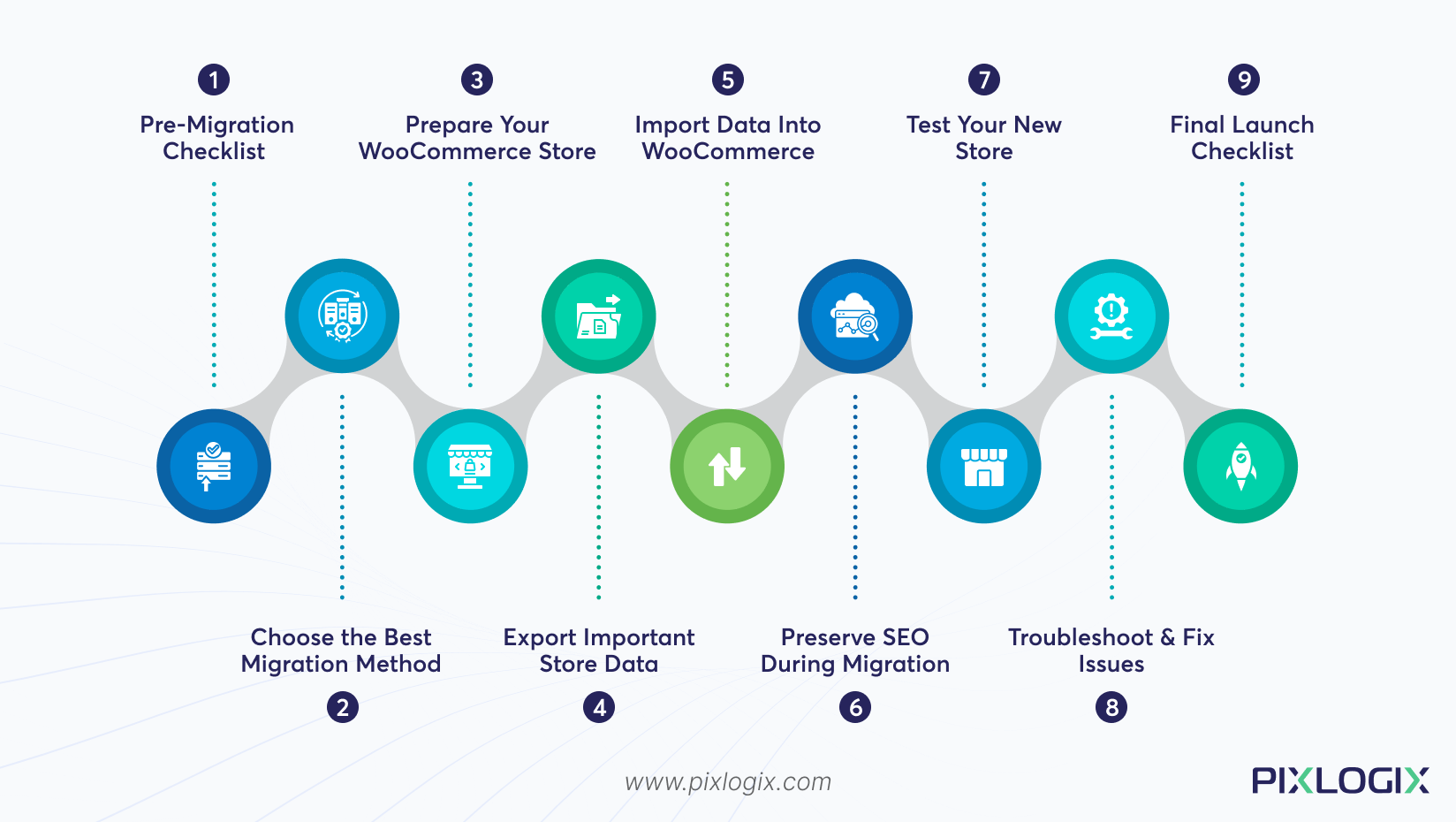
A strategic roadmap ensures a risk-free migration. It helps protect revenue, rankings, and customer trust from day one. Follow this WooCommerce store migration guide for better results:
1. Pre-Migration Checklist:
A smooth WooCommerce migration starts with proper preparation. Completing these steps upfront prevents most data and SEO errors later.
- Create a full backup of the database, product media, order logs, and custom theme/code files. This helps you restore data instantly if anything fails.
- Organize existing store data to avoid mismatched listings after migration.
- Document third-party integrations. This includes CRMs and payment gateways.
- Identify WooCommerce alternatives that could replace your old features. Planning alternatives now prevents post-migration functionality gaps.
Overview: Don’t migrate the store to WooCommerce without proper backups, data organization, and feature mapping. This creates a risk of losing critical store assets or breaking customer trust.
2. Choose the Best Migration Method for Your Store
Every store is different–there is no “one-size-fits-all.” So, pick the best solution based on your store’s size, structure, and complexity. Here’s how to choose them:
- Manual Migration: This is a good option for small stores. It gives them complete control over what gets imported. But you must migrate all data with precision.
- Automated Migration: This method is best for mid-sized stores. It helps them reduce errors and speed up import/export. For automation, make use of these tools–Cart2Cart and LitExtension.
- Custom Migration: Choose this method when you have a complex order that needs a custom database structure. A professional WooCommerce development agency can handle this setup more effectively.
Overview: Not all stores are created equal. Complex stores often demand a professional WooCommerce migration service. So, choose the right method that matches your business workflow.
3. Prepare Your WooCommerce Store
Once migration starts, fixing basic settings becomes difficult. So, before you begin importing, configure WooCommerce properly.
- Install WordPress and WooCommerce.
- Set currency, tax rules, and payment gateways.
- Select the right WooCommerce migration plugin. You can use Yoast for SEO purposes and LiteSpeed Cache for increasing your site’s speed.
- Select compatible themes like Astra or Kadence.
- Configure product attributes, order statuses, and permalink settings.
Overview: Preparing the environment in advance. So that the WooCommerce migration tool can map data accurately.
4. Export All Important Data From Your Old Store:
Exporting your stored data in well-organized batches prevents corruption. This step is to protect your business continuity during migration.
Export:
- Products, images, categories, attributes, and variations.
- Customer accounts with encrypted passwords. Also, ensure that they can log in seamlessly without forced password resets.
- Order history, invoice, and refund details.
- Reviews, coupons, and custom fields.
Quick Takeaway: Structured exports reduce the risk of losing customer access or sales history. It helps you migrate WooCommerce database files safely.
5. Import Your Data Into WooCommerce Safely
Importing must be done with precision. The goal is to recreate the exact functionality of the old store–not just copy raw data.
- Import product catalogues while retaining SKUs, variations, and pricing structure.
- Import customers while preserving password encryption. This allows users to log in normally after migration without breakouts.
- Import order history to maintain accurate customer support and reporting. Every detail must sync with the customer’s accurate statuses.
- Validate mapping to avoid missing fields and mismatched records.
Quick Overview: Importing data into WooCommerce is about rebuilding your store from scratch. It should mimic customer expectations, without breaking logins and orders.
6. Preserve SEO Performance During Migration
Many stores lose rankings and revenue after migration. This is because their SEO assets aren’t transferred properly.
- Search engines already trust your existing URLs. So, keep the same URL to prevent sudden ranking drops and broken backlinks.
- Apply 301 redirects when changing URLs. This avoids data loss during heavy traffic.
- Migrate meta titles, meta descriptions, and schema properly. This helps the migrated store replace the old one in search results without downtime.
- Update Search Console to speed up recrawling.
Quick Overview: Preserving SEO during migration is essential. It ensures Google sees your new shop as a continuation of your old one.
7. Test Your New WooCommerce Store Completely
Before going live, the migrated store must behave exactly like the previous one. There must be no checkout failures, login issues, or broken mobile layouts. A thorough testing phase ensures customers can shop without friction from day one.
Test:
- Checkout and payments.
- Customer login and account access.
- Stock deduction, order updates, and email notifications.
- Page speed and mobile responsiveness.
Quick Overview: Testing ensures that everything works exactly as users expect before you go live. Evaluate checkout details and customer logins during every testing process.
8. Troubleshoot and Fix The Problems
Even with a smooth migration, mistakes might happen anytime. Addressing them early is essential. It prevents broken customer experiences, inaccurate reporting, and conversion loss.
- Sometimes, images don’t appear after migration. This is because the old file path doesn’t match the new one. Fix this issue by regenerating paths or reuploading images.
- SKU mismatches happen when variations are not imported properly. Resolve it by remapping, eliminating duplicate files, and reimporting affected data.
- Customers face login issues when encrypted passwords are not imported properly. So, ensure the encrypted password field is included during each import.
- Migration sometimes exposes compatibility issues between plugins, themes, or PHP versions. Fix the workflow by re-enabling the conflict one, checking PHP versions, and disabling unused WooCommerce migration plugins.
Quick Overview: After migration, small issues can arise. This affects product visibility, customer access, and overall store performance. So, identify and fix the issues immediately.
9. Final Launch Checklist
Before going live, make sure every system performs well. This prevents revenue loss, offering a hassle-free shopping experience. Here’s what to check:
- Payment gateways activated and tested.
- Transactional emails are working end-to-end.
- 301 redirects are fully implemented.
- Caching and CDN enabled.
- Automatic backups are running.
- Analytics and search console tracking live.
Quick Overview: A final launch checklist is the last step to navigate migration issues.
Conclusion
A successful WooCommerce migration isn’t about moving data. It’s about preserving exact data, SEO, and revenue flow. Businesses can migrate confidently with proper planning. From accurate mapping to SEO preservation and testing to troubleshooting, your migration approach should include everything. So, follow the right WooCommerce store migration guide that’s strong and future-ready.
Want to migrate without losing data? Then partner with a reliable WooCommerce development company like Pixlogix. Our experts handle everything, from product data to SEO and payments. We offer top-grade WooCommerce development services in India that ensure 100% data integrity. Contact us today to migrate your store with confidence.


Written by Samir Bhimbha Founder & CEO
Samir Bhimbha is the Founder & CEO of Pixlogix Infotech Pvt. Ltd. which offers web and app solutions to fulfill business's online needs and help to improve their online presence with many clients in the USA, Europe, Australia, and more. He is a skilled entrepreneur, web designer, developer, and team leader who can handle every situation. With 15+ years of experience in UX/UI design and web development, he is leading a team of IT professional talents.
Related Post

Core PHP vs Laravel: Which is Better for Backend Development

Why React.js is the Top Choice for Modern Web Development

Get in Touch Now!
Have a word with our expert consultants about your next project to get suggestive guidance & proposal.
Sales Inquiry


HR Inquiry
 India’s First SOTD Winner on Awwwards.com – 2010
