

Today’s visitors look at every detail. That’s why a business website must guide them toward action. So choose your features wisely. The right WordPress features for business website development help you stand out from competitors. Thinking–how to find the essentials? Then, focus on your priority list that ranges from usability and SEO to speed and security. Growth matters too. Your setup should adapt as the company expands and priorities change.
What makes a site effective? This guide explores the essential WordPress website features that a site needs to deliver better performance and usability.
What Core Features Should Every Business WordPress Website Have?
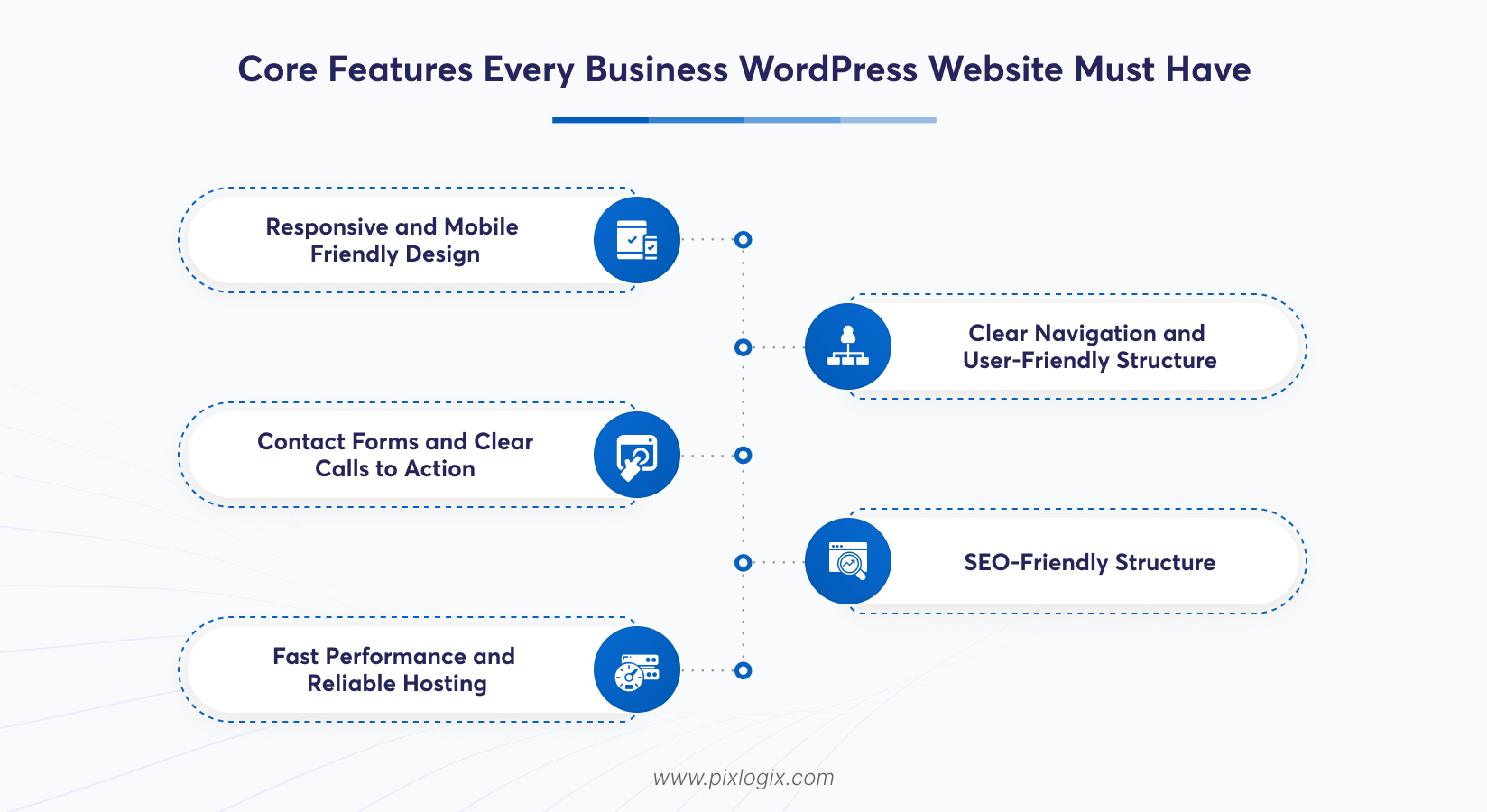
A website needs practical value. It should help visitors find what they need and understand your services without confusion. So, what should your website include? Let’s take a look.
Responsive and Mobile-Friendly Design
It’s hard to judge visitors. They may use their desktops or even phones to browse. Thus, pick a responsive WordPress website. It can adapt its layouts to any screen size.
Use readable text. Include properly sized images and simple menus. Forms matter too, so avoid lengthy ones. These features allow visitors to submit enquiries easily.
Clear Navigation and User-Friendly Structure
Good navigation saves time. So, organize website pages into clear categories so visitors can find relevant information without browsing every page. Use descriptive menu labels. Also, add relevant internal links to connect related pages. This also guides visitors through the website.
Contact Forms and Clear Calls to Action
Simple connections build trust. So, include contact forms, clickable phone numbers, and emails. These elements let visitors reach you directly. And in those forms, ask only for their name, email address, and service requirement. They are often enough to start. Place CTAs in areas where they match the page’s purpose. Finally, test every detail. From form submission to email alerts, assess all to find it reaches the right team.
SEO-Friendly Structure
Search engines need clear signals. That’s why WordPress websites should include editable page titles, descriptive URLs, and XML sitemaps. Add indexing controls, too. These elements help search engines interpret your pages.
SEO tools simplify these settings. Their descriptive headings organize information, while meaningful image alt text improves accessibility. These features improve content clarity.
Fast Performance and Reliable Hosting
Speed plays a crucial role today. Modern-day visitors often expect their pages to load without delays. So, choose good hosting. Ensure it perfectly suits your traffic and resource needs. Then, optimize images. Also, enable caching and remove unnecessary scripts to reduce loading time.
You need a content delivery network (CDN) here. It can deliver static files faster across different locations. Use Google PageSpeed Insights. It lets you find the performance issues and fix them earlier.
What Features Support Website Security and Management?
A website needs reliable management. Let’s look at the features that support smoother day-to-day administration:
Security and Access Controls
Securing means controlling access. Use strong passwords and enable role-based permission methods. They help prevent unauthorized access. Also, keep your site access limited to essential functions. Updates bring challenges. So, ensure your WordPress core and plugins are in their latest versions. Then, enable HTTPS. A web application firewall adds another layer of protection.
Regular Backups
Problems may occur at any time. So, check for failed updates, hosting issues and unexpected errors. Then, back them up. This is the best way to protect your website files and essential settings. Also, store them carefully. Keep your backup copies separately from your main hosting environment. Test the recovery process. This ensures that you can restore important pages when something goes wrong.
Easy Content Management
Content updates should be simple. With WordPress block editors, teams can change their pages anytime. They can also publish blogs. Service details can be updated, and images can be replaced too. But there is no need to change code each time.
Reusable blocks bring consistency. Their clear publishing workflows also help maintain content quality. Want unique content? Then, choose custom WordPress development services. It can offer tailored solutions that fit your plans.
What Advanced Features Can Help a Business Website Grow?
A reliable website matters. So, adding advanced features is essential to track your business performance and adapt.
Analytics and Conversion Tracking
Traffic is just one part. So, use tools like Google Analytics 4 to track configured events and figure out where users are lost. Use Search Console also. It shows search impressions, clicks, and indexing issues. Also, set clear conversion goals. Track meaningful actions, including enquiries.
Third-Party Integrations
Add-ons save time. That’s why WordPress supports CRM and payment tool integrations. This reduces manual work. More than that, its booking tools let visitors schedule their appointments online. But setting it up isn’t easy. You need to check its compatibility and API limits before implementation. Collect only essential information. Also, ensure each integration meets applicable privacy requirements.
Scalable and Custom Functionality
Businesses change over time. Growing companies may need client portals or multilingual content. They can go with custom WordPress development services. This is because they can address needs that standard plugins cannot meet effectively. They bring a scalable database. Plus, their efficient code, reliable hosting, and compatible integrations support future growth.
How Should a Business Choose the Right WordPress Features?
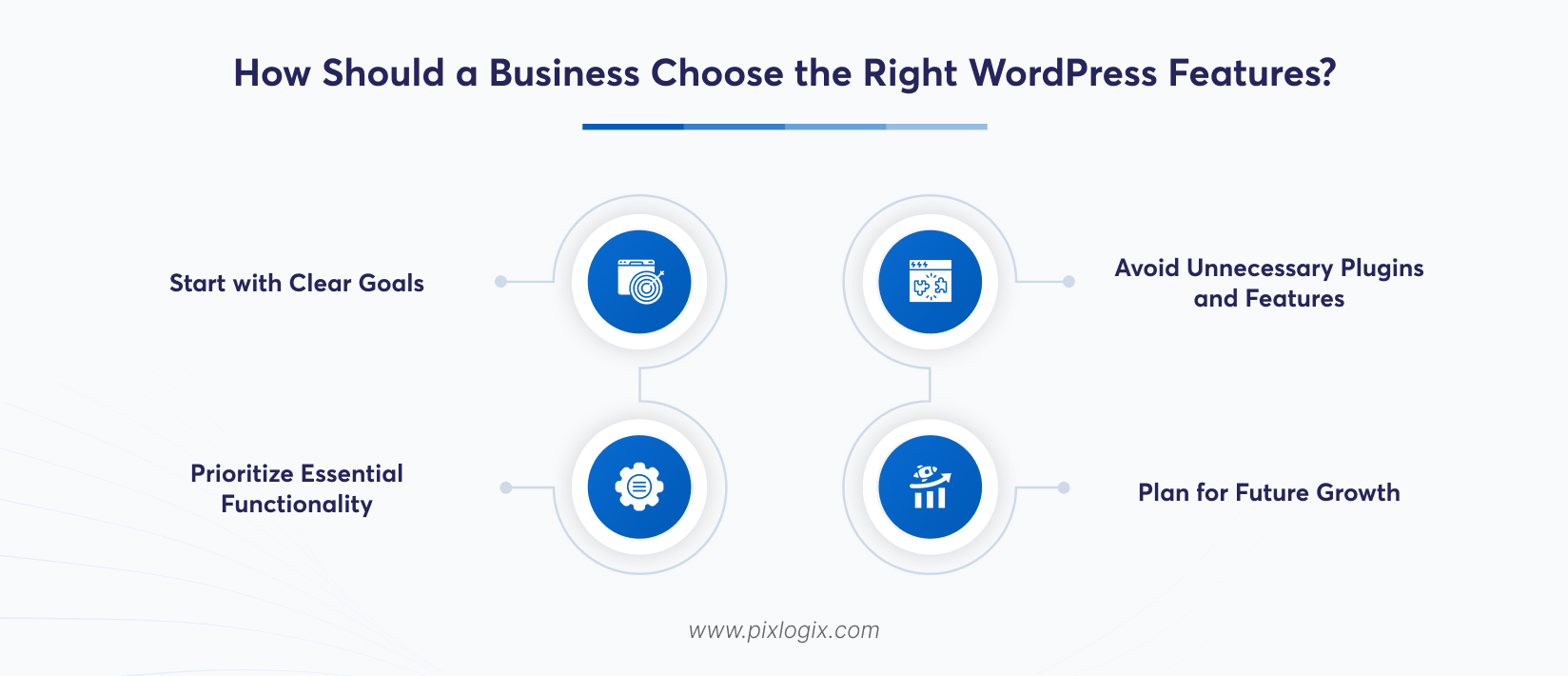
Every website isn’t the same. So, choose a reliable partner with this step-by-step process in mind.
-
Start with Clear Goals
First, analyze your project. Then, identify whether you want the website to generate leads or sell products. Map these details clearly.
-
Prioritize Essential Functionality
Follow your designed roadmap. Take care of navigation, mobile usability, and security issues. Look at your site SEO. Later, check contact options and performance before investing in complex features. This keeps the initial setup focused.
-
Avoid Unnecessary Plugins and Features
Don’t add more plugins. It’s because every additional one can introduce maintenance requirements or security risks. So, review before installing that. Evaluate its update history and compatibility with existing functionalities.
-
Plan for Future Growth
Include long-term work. Consider expected traffic, content expansion, and internal editing workflows. Define every detail. Add who will manage updates and resolve technical issues after launch.
Still struggling to choose the right features? Then, get help from a top-rated WordPress development company in India. They implement the right features that fit your project.
Conclusion
The right features depend on your goals, user expectations and operational requirements. Identify these priorities first. Then, choose WordPress features that support your business activities and make navigation easier for visitors. Responsive design is the first factor. SEO, speed, security, and simple management follow this plan. Use analytics to find useful insights. Integrations connect essential tools, while custom functionality accommodates changing requirements. Review your site regularly. Make improvements that address visitor needs and help achieve business goals.
Ready to build a future-ready WordPress website? Then, partner with a leading WordPress development company in India like Pixlogix. From implementing the right features to strengthening website security, we offer custom WordPress development services that deliver lasting value. Contact us today! Let’s turn your WordPress website into a stronger business asset.
Frequently Asked Questions
What features are essential for a small business WordPress website?
Responsiveness is the main factor. Other than that, intuitive navigation, SEO tools, fast loading, and strong security, all are essential. Easy content management matters too. These core features improve search visibility and generate more leads.
Should a business WordPress website use plugins for every additional feature?
No. But too many plugins can slow your site, despite offering more design options. They can also bring security risks. So, include only necessary ones and keep them updated.
Is a custom WordPress website better for businesses with specific requirements?
Yes. Standard themes and plugins can’t meet unique business requirements and support growth. Custom development is flexible. It also offers tailored functionality, but it costs more than ready-made solutions.
How can a business WordPress website be prepared for future growth?
Have long-term plans. Choose scalable hosting with a flexible theme and clean code. Keep content organised. Add analytics and update regularly so new features can be added easily.
What should businesses consider before choosing WordPress website features?
Have your key goals in mind. Look at your audience needs, budget, and WordPress website maintenance capacity. Select features based on priority. This approach improves usability, SEO, speed, and security before adding anything optional.

Written by Samir Bhimbha Founder & CEO
Samir Bhimbha is the Founder & CEO of Pixlogix Infotech Pvt. Ltd. which offers web and app solutions to fulfill business's online needs and help to improve their online presence with many clients in the USA, Europe, Australia, and more. He is a skilled entrepreneur, web designer, developer, and team leader who can handle every situation. With 15+ years of experience in UX/UI design and web development, he is leading a team of IT professional talents.
Related Post
How to Build a SaaS Website Using WordPress?
How to Build Multilingual Websites with WordPress

How to Create a Landing Page in WordPress Without Using Code?

Get in Touch Now!
Have a word with our expert consultants about your next project to get suggestive guidance & proposal.
Sales Inquiry


HR Inquiry
 India’s First SOTD Winner on Awwwards.com – 2010