

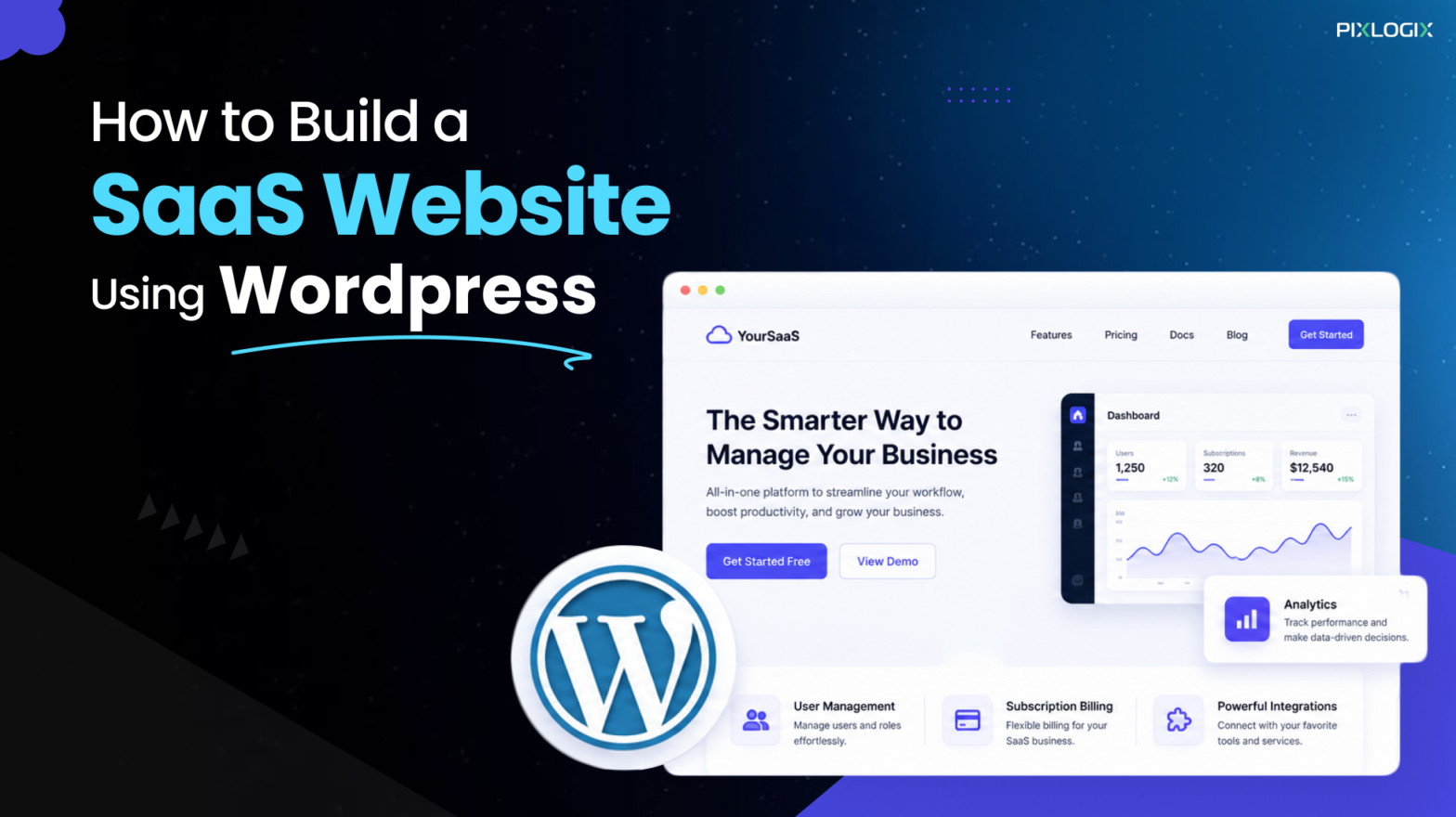
A SaaS website doesn’t sell things. It delivers software as a service, letting visitors sign up and start using your tool without installations. Founders everywhere chase this model. By linking to real user feedback, it brings recurring revenue.
WordPress website development makes the job practical. It powers 41.9% of all sites worldwide and nearly 60% of the CMS market, according to W3Techs. That scale changes everything. Plugins now cover almost every SaaS website development need, from billing to dashboards. Moreover, the talent pool is also bigger than any rival CMS. You don’t need a huge team. WordPress SaaS website is faster, cheaper, and easier than ever.
Now you might think-how to build a SaaS website using WordPress? In this blog, let’s explore the step-by-step development process. We’ll also detail why WordPress fits SaaS founders, the best features, and the mistakes that quietly sink good products. By the end, you’ll know all about WordPress without wasting time and budget.
Why Choose WordPress for a SaaS Website?
IT leaders don’t pick WordPress for a SaaS website out of habit. They choose it because the platform handles the boring, expensive parts of the build. So, the team can focus on the actual product.
Easy to use
In WordPress, there is no need to code a platform from scratch. Instead, the dashboard itself stays intuitive even for non-technical developers.
Flexible
When you create a SaaS platform with WordPress, you’ll get access to thousands of themes and page builders. So, there is no need to fight for a rigid template.
Highly customizable
With WordPress, it’s possible to customize fields and block patterns. This makes redesigning simple. So, you can craft a complete SaaS landing page without a single line of code.
Cost-effective
Tailored SaaS website design costs big. But WordPress flips that equation and your spend shrinks.
Scalable
The stack scales with your business needs. If you want, you can add caching or move to managed hosting as traffic grows.
Seamless Integration
Payment gateways are simple. Stripe, Razor pay, and others connect through existing plugins instead of heavy custom API work. Your SaaS stack stays connected. Thus, your WordPress SaaS website talks to the rest of your ecosystem out of the box.
Key Features Every SaaS Website Needs
Before touching any plugin, map out the features your SaaS web development plan must include:
Clear value proposition
Five seconds is all you get. Visitors should know what your product does the moment they land. Make the hero section do the work with a bold CTA.
Pricing and subscription plans
Be clear about pricing. Use plain language and plugins like Member Press or Paid Memberships Pro. This makes your upgrades and downgrades happen automatically.
User registration and login
Sign‑up should feel effortless. A frictionless flow keeps drop‑off rates low by removing every extra step. Keep it simple with name and e-mail.
Free trial or demo
Trials build trust fast. Letting people try before they buy works better than any sales copy. Plugins make it easy. Most membership tools support trial periods natively, so you can gate premium features for a set number of days without writing custom code.
Secure payment gateway
Security builds confidence. Customers need to know their card details stay protected every time they pay. Use trusted gateways. Connect Stripe or Razor pay through your membership so payment data never touches your own server, keeping you clear of PCI‑DSS compliance headaches.
Customer dashboard
One login should do it. Users need to manage subscriptions, usage, and settings from a single place. Plugins handle the heavy lifting. Membership tools generate this account page automatically, and you can extend it with custom fields to surface usage stats or invoices without building a separate portal.
Knowledge base and support
Support should scale itself. Self‑serve documentation reduces tickets and keeps retention strong. Make answers easy to find. A dedicated knowledge base plugin, paired with a searchable FAQ layout, cuts down repetitive queries before they ever reach your inbox.
Security and data protection
Security isn’t optional. SSL certificates, regular backups, and compliance with data laws like US privacy regulations or the EU’s GDPR are now baseline requirements. Get the basics right. So, your SaaS platform on WordPress will feel like a custom stack.
Step-by-Step Guide to Building a SaaS Website Using WordPress
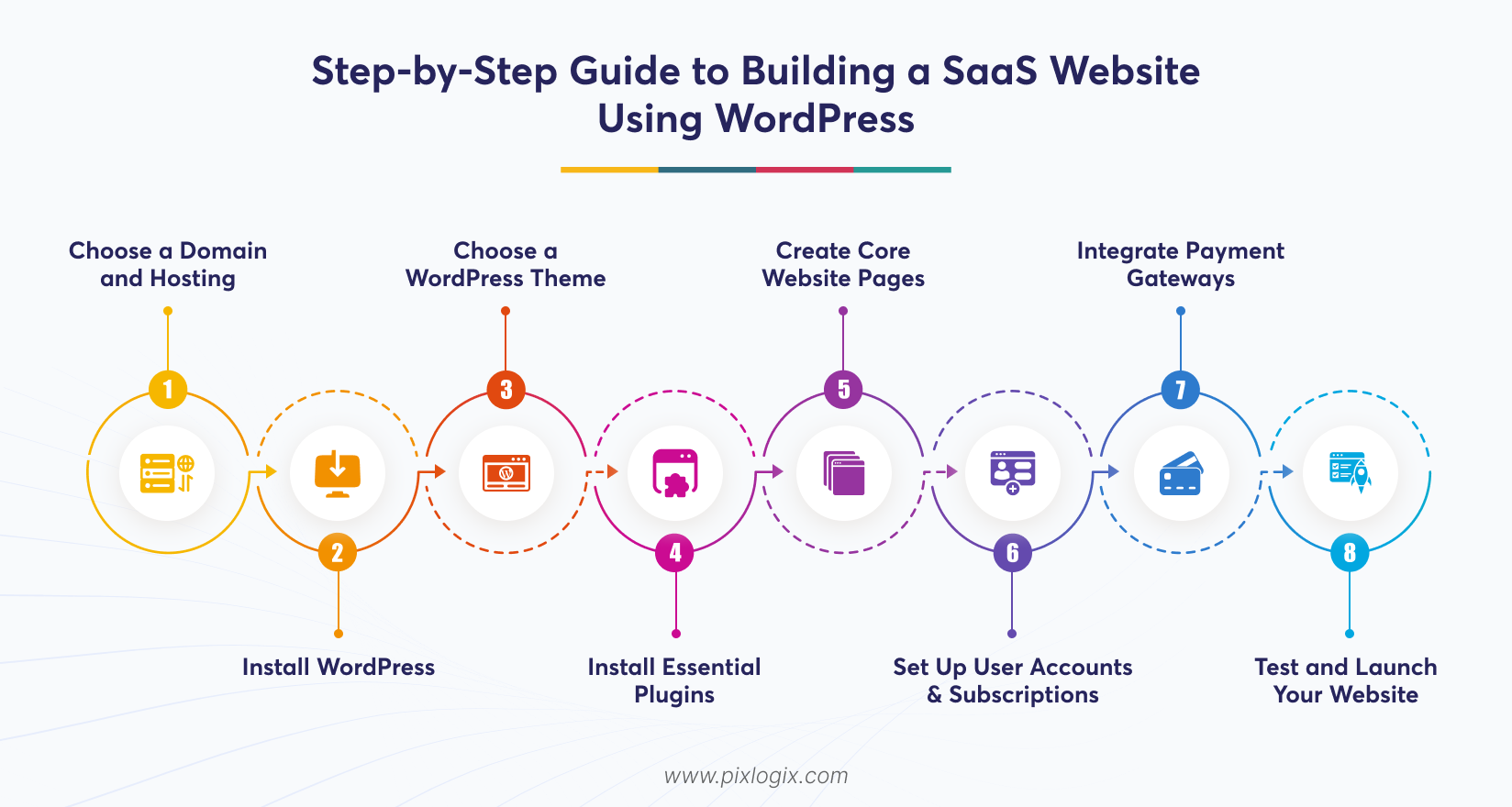
Strong platforms don’t happen by chance. So, lay the groundwork with smart choices, and this WordPress SaaS development guide will show you that:
Choose a Domain and Hosting
Start by picking the name that’s short and brand able. Hosting matters more than you think. Choose a provider built for performance, since your SaaS site will run heavier scripts than a typical blog. Managed hosting helps. Built‑in caching and staging environments save headaches later.
Install WordPress
Most WordPress SaaS development providers now offer one-click installation. The next step after installation is to protect your administrator login. Use a strong password as your first shield.
Choose a WordPress Theme
Find the right look. Pick a theme built for software products, not a generic business template. Save time on layouts. Look for ready‑made sections for a SaaS landing page, so you spend less time customizing by hand.
Install Essential Plugins
Plugins make the platform. You’ll typically need a membership or subscription plugin, a payment gateway connector, an SEO plugin, a caching plugin, and a security plugin. Together, they transform. A standard WordPress setup becomes a functioning SaaS platform.
Create Core Website Pages
Pages should serve one purpose. Build out a dedicated SaaS landing page for paid campaigns. Keep it focused. Each page should have one clear goal and one clear call‑to‑action.
Set Up User Accounts and Subscriptions
Control starts at the plugin. Configure it to handle registration, login, and plan management without extra steps. Keep access clean. Map each subscription tier to the right features so customers only see what they’ve paid for.
Integrate Payment Gateways
Payments should match your market. Connect Razor pay or PayPal based on the location of your customers. Test everything first. Recurring billing, upgrades, downgrades, and cancellations should all be verified before you accept real payments.
Test and Launch Your Website
Test the journey yourself. Walk through it like a real user, from signing up and using the dashboard to cancelling payment. Check the details. Page speed, mobile rendering, and broken links all need to be flawless. Only then go live.
All these steps show the best way to build a SaaS website. They help cut weeks off your launch timeline.
Common Mistakes to Avoid When Building a SaaS Website
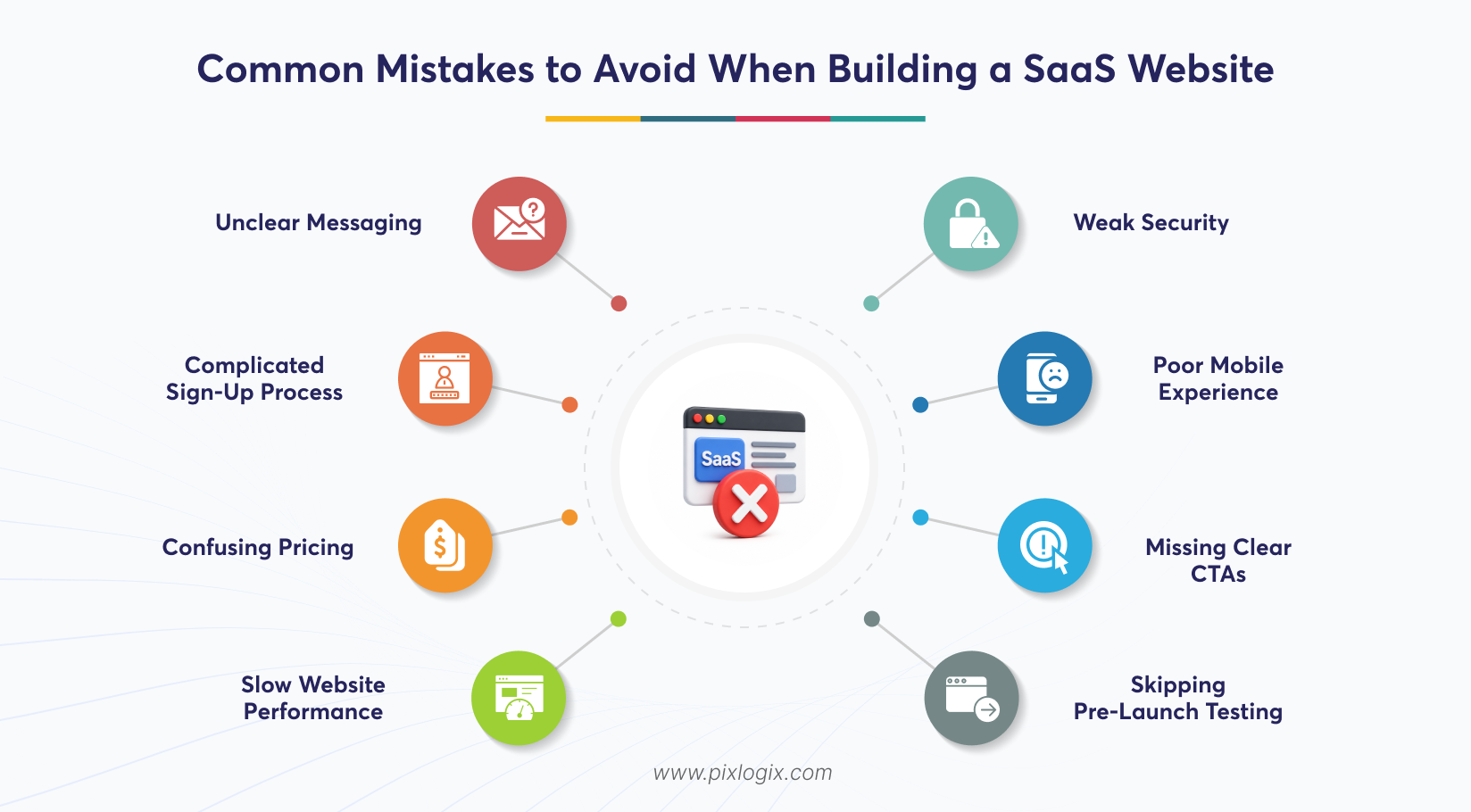
Even a well-planned SaaS website design can fail if these mistakes creep in:
Unclear messaging
When visitors see your product, they must understand their needs and use. If not, they leave within seconds.
Complicated sign-up process
Don’t add extra fields on your registration form. It costs you conversions.
Confusing pricing
Hidden fees or vague tier names create distrust before the trial even starts.
Slow website performance
A sluggish site kills momentum, especially on mobile networks.
Weak security
Skipping SSL or backups puts customer trust and data at risk.
Poor mobile experience
A large share of SaaS traffic now comes from phones. This is where you need a responsive design.
Missing clear CTAs
Every page needs a next step for the visitor to take.
Skipping pre-launch testing
Bugs found by customers cost far more than bugs found before launch.
See our work on the Nestork PMS Tool website, designed for a better SaaS user experience and to maximize project management efficiency.
https://www.pixlogix.com/work/nestork-pms-tool/
Conclusion
Big budgets aren’t required. Building a WordPress website for a SaaS business no longer demands an in‑house engineering team. You need to focus only on the essentials. By combining the right hosting, plugins, and design choices, founders can grow smarter. Follow this guide. It can turn your WordPress into a SaaS engine, delivering customer-ready experiences.
Want to know how to build high-performing SaaS sites? Then, partner with a leading web development company in USA like Pixlogix. We offer end-to-end SaaS services, from choosing the right hosting and theme to setting up a launch-ready dashboard. Get a quote today! Let’s build your SaaS website the right way.

Frequently Asked Questions
Is WordPress suitable for SaaS startups with limited budgets?
WordPress fits budget‑conscious SaaS startups. It replaces costly custom development with affordable plugins. Early‑stage founders benefit most. From subscriptions and payments to dashboards, all are handled with ease. But as growth accelerates and custom logic becomes more complex. That’s where you need to shift to a dedicated framework, which is the smarter path.
Is WordPress secure enough for SaaS websites?
WordPress is secure when set up right. SSL, regular backups, strong login protection, and plugins like Wordfence keep SaaS websites safe. The real risk isn’t the platform. It’s outdated plugins or weak passwords—so consistent maintenance matters.
Why do many SaaS companies choose WordPress for their websites?
Many SaaS startups lean on WordPress. It slashes development costs, launches faster, and still supports subscriptions and dashboards through plugins. The bonus is scale. Simple content management makes updates easier.
How long does it take to build a SaaS website using WordPress?
A SaaS site on WordPress doesn’t take forever. For straightforward products, expect 3 to 6 weeks-covering hosting setup, theme customization, plugin installation, and testing. Complex builds stretch longer. Usage‑based billing or custom integrations can push the timeline to 8–10 weeks, depending on how deep your requirements run.
What are the biggest mistakes when building a SaaS website on WordPress?
Mistakes cost SaaS founders more. Complex pricing structures, long sign-ups, and overlooked testing can drive potential customers away. Security lapses hurt trust. Slow pages and poor mobile experiences drive customers away-because in SaaS, speed and reliability matter more than in typical websites.

Written by Samir Bhimbha Founder & CEO
Samir Bhimbha is the Founder & CEO of Pixlogix Infotech Pvt. Ltd. which offers web and app solutions to fulfill business's online needs and help to improve their online presence with many clients in the USA, Europe, Australia, and more. He is a skilled entrepreneur, web designer, developer, and team leader who can handle every situation. With 15+ years of experience in UX/UI design and web development, he is leading a team of IT professional talents.
Related Post
Why Businesses Need a Professional Web Development Company



Top 10 Signs Your Website Needs Better UI/UX

Get in Touch Now!
Have a word with our expert consultants about your next project to get suggestive guidance & proposal.
Sales Inquiry


HR Inquiry
 India’s First SOTD Winner on Awwwards.com – 2010