

Have you ever wondered, why a multilingual WordPress website grows faster when compared to language-limited ones? The answer is simple. They reach customers more naturally by presenting content in the languages they use every day.
Today, businesses are expanding beyond geographical borders. It has fueled the demand for personalized digital interactions that reflect the language of native users. That’s where multilingual website WordPress comes into play. It is designed to meet individual language preferences, grabbing the attention of potential customers all over the world. Well, their impact goes beyond user experience. WordPress multilingual websites improve user experience and SEO, helping businesses increase search visibility. Thus, attracting local audiences becomes much easier.
Do you know how to build a multilingual website in WordPress? In this blog, we’ll look at a detailed step-by-step guide, from choosing the plugin to optimizing it for global reach. By the end, you’ll get the key strategies to reach all buyers.
What Is a Multilingual Website?
A multilingual website is designed for broader audiences. It lets them search and interact in their preferred language. For example, this setup may provide the same pages in different languages–English, Spanish, and French. Thus, it’s easy to deliver a consistent experience.
Key Steps:
- Manual Translation
Here, the content is translated by humans for greater accuracy and localization.
- Automatic Translation
Certain tools and plugins are used to generate content automatically.
- Hybrid Translation
This setup is a combination of machine and human work. Thus, editors can work faster with more precision.
Quick Takeaway: These sites travel with their audience. That simple shift builds trust, boosts SEO, and accelerates global growth.
Why Build a Multilingual Website in WordPress?
Why choose WordPress for a multilingual website? It remains the popular choice of leading enterprises as it offers the tools and flexibility needed. Moreover, it helps make your content more accessible.
Key Reasons to Choose:
- Extensive plugin ecosystem.
- A centralized dashboard makes translation easier.
- SEO-friendly structure improves international search visibility.
- Scalable for global growth.
- Possible to create WooCommerce multilingual stores.
- No extensive coding knowledge required.
- Benefit from multiple resources and the global WordPress community.
Popular WordPress Multilingual Plugins:
- WPML: Manage multilingual content.
- Polylang: A lightweight and flexible plugin.
- TranslatePress: It allows visual front-end translation.
- Weglot: This setup comes with both automatic and manual translation options.
Quick Takeaway: WordPress makes going multilingual simple. With global community support, it’s the smartest way to scale your website worldwide.
Step-by-Step Guide to Building a Multilingual Website in WordPress
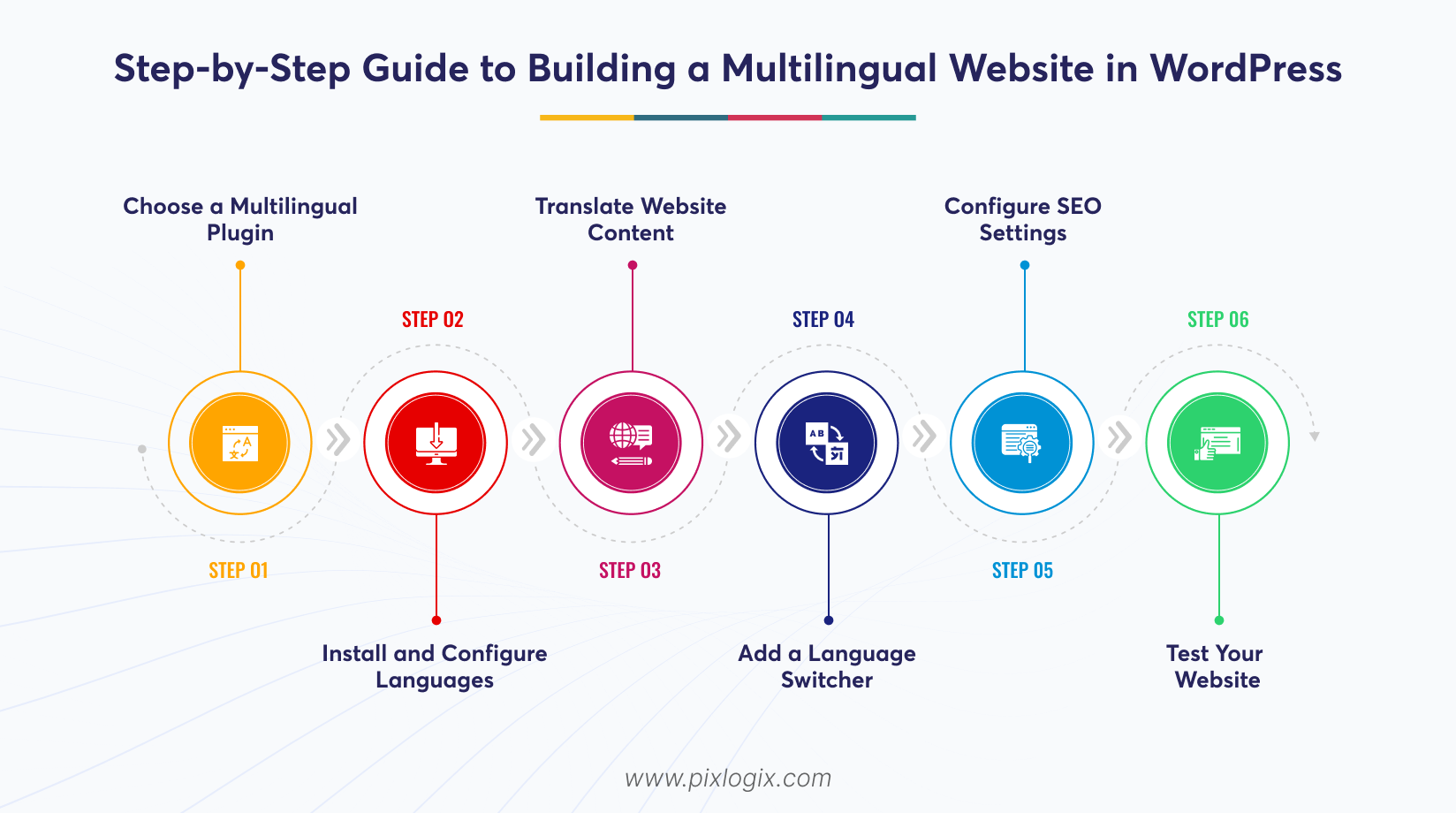
Success starts with structure. To reach international audiences and global SEO growth, you need a clear process. That’s where implementation comes in. A step‑by‑step approach ensures every detail is covered, from translation tools to testing. This guide shows you how.
Step 1: Choose a Multilingual Plugin
WordPress does not provide built-in multilingual content management. That’s where you need the best WordPress multilingual plugins. It helps manage languages and translations efficiently.
Process:
- Identify your target countries and audience requirements.
- Estimate the amount of content that needs translation.
- Choose a plugin and ensure it supports multilingual SEO features.
- Verify WooCommerce compatibility.
- Review translation options.
- Evaluate whether the plugin can support future growth.
Step 2: Install and Configure Languages
Now, finish your WordPress multilingual setup. Once installed, configure languages properly. This ensures your website is easy to manage as you expand into multiple regions.
Process:
- Log in to your dashboard.
- Install your chosen multilingual plugin.
- Activate it and launch its setup wizard.
- Select your default language and configure it.
- Choose a language URL structure and save the settings.
- Finally, verify that all selected languages are active.
Step 3: Translate Website Content
After configuration, it’s time to translate your WordPress website. It helps visitors understand your offerings and improve engagement across different markets.
Process:
- Start by translating high-priority pages.
- Translate blog posts and informational pages.
- Translate menus, widgets, forms, and navigation elements.
- Use the plugin’s translation editor or automatic translation tools.
- Review all translations manually before publishing.
- Publish and verify before making it live.
Step 4: Add a Language Switcher
Wondering how visitors can switch between languages? The best way in WordPress is to create a button for a different language. It helps classify them through built-in switching options.
Process:
- Open your plugin settings.
- Locate the language switch section.
- Choose your style–dropdown, language names, flags, or a combination.
- Customize and add it to the header.
- Preview and test the language switcher across multiple pages.
Step 5: Configure SEO Settings
Now, focus on your multilingual SEO features. This is essential to make search engines properly index and rank each language version. Also, it helps maximize international visibility and organic traffic.
Process:
- Create language-specific URL structures. For example, /en/, /fr/, or /es/.
- Enable hreflang tags through settings.
- Translate page titles and meta descriptions.
- Generate sitemaps.
- Submit them to Google Search Console.
- Monitor indexing and search performance regularly.
Step 6: Test Your Website
Before launching, thoroughly test every language version. This helps identify issues before users encounter them.
Process:
- Switch between all available languages and verify page redirection.
- Check menus and navigation links.
- Review and test language switcher functionality on every page.
- Inspect layouts.
- Verify language-specific URLs, metadata, and hreflang tag implementation.
- Test responsiveness.
Quick Takeaway: By following these steps, you can confidently create multilingual website WordPress projects. Each step matters. From selecting plugins to testing the overall functionality, every detail is a growth strategy.
Common Mistakes to Avoid
Now you know how to build, but you should also know their causes. Because even a simple error can bring costly issues. That’s where translation accuracy matters. You must identify and avoid the common mistakes in the very first stage. Look at those:
- Mistake: Relying entirely on automatic translations.
Avoid this by using machine translation as just the starting point. But always review and edit content manually. This ensures accuracy and helps maintain your brand consistency.
- Mistake: Ignoring hreflang tags.
Try to implement the hreflang attributes properly. So that search engines can identify the correct language version for users.
- Mistake: Not translating page titles and meta descriptions.
First, localize all SEO elements. As a result, websites can gain higher click-through rates.
- Mistake: Poor language switcher placement
Avoid this by creating a button for different languages. Also, it’s essential to place the language switcher in a visible location.
- Mistake: Creating duplicate content across language versions
Ensure each translated page is properly localized and indexed. This approach prevents SEO conflicts and content duplication issues.
- Mistake: Skipping testing after translation
Regularly test translated pages, menus and forms. Thus, you can easily avoid costly errors that might affect later stages.
Is a Multilingual Website Worth It?
For many businesses, this is a smarter growth strategy. A multilingual website WordPress solution attracts a wider audience. Furthermore, it increases the conversion rate globally.
Key benefits:
- Increasing organic traffic.
- Reaching a global audience with accessible content.
- Enhancing user experience and building trust.
- Converting more with the native-language experience.
Quick Takeaway: Now, you know how much it is worth it to build a multilingual website WordPress. However, it’s not that effective for local websites. It’s because they focus only on a very small or single-language user base.
Conclusion
A multilingual WordPress website changes everything. It expands your global reach and boosts search visibility across diverse markets. Leading enterprises often go with this choice. Their benefits go far beyond traffic, from grabbing the attention of international audiences to strong SEO features.
But here’s the catch. Success depends on the right setup-accurate translations and seamless language switching. That’s where you need to work with a step-by-step strategic approach. This guide shows how to create a multilingual website in WordPress. Use it to identify the common mistakes and their solutions.
Want to build high-converting multilingual sites? Then, partner with a trusted WordPress development company in India like Pixlogix. We help them deliver results across borders. With custom WordPress development services, we ensure that your site is scalable and reliable. Get a quote today! Let’s help you create multilingual WordPress websites that convert global-level audiences.

Frequently Asked Questions
Can I add a second language to my WordPress site without starting over?
Yes. You can include it with the help of extensive plugins present within the ecosystem. WPML or Polylang make that simple. They can translate content and manage languages more efficiently.
What sets a multilingual website apart from a translated website?
The major gap is scope. A translated website simply converts text into another language. But a multilingual website is not like that. It adapts the design, user experience, and preferences to deliver intuitive experiences.
How do multilingual websites handle SEO and AI?
A multilingual site can manage both. It combines technical precision with cultural adaptation to correct hreflang tags. More than that, they deliver localized keywords. This ensures high visibility in Google and AI search engines.
How does WordPress organize multilingual content?
It starts with a solid structure. WordPress supports multilingual content through extensive plugins. Built-in internationalization features also promote them. A common approach is linking. It connects translated versions of posts, pages, and taxonomies. This allows visitors to switch between languages effortlessly. At the same time, search engines can identify and index correctly.
How do I handle customer support across multiple languages?
It requires the right tools. Here, customer support can be managed by combining translation plugins with AI-powered live chat and localized help resources. Use platforms like Kommunica. They support a global audience.
Which WordPress plugins are best for multilingual websites?
There are many options to choose from. However, WPML, Polylang, and Weglot are widely preferred for their ease of use and translation capabilities. Each solution follows a different approach. The right choice ultimately depends on your website’s goals.

Written by Samir Bhimbha Founder & CEO
Samir Bhimbha is the Founder & CEO of Pixlogix Infotech Pvt. Ltd. which offers web and app solutions to fulfill business's online needs and help to improve their online presence with many clients in the USA, Europe, Australia, and more. He is a skilled entrepreneur, web designer, developer, and team leader who can handle every situation. With 15+ years of experience in UX/UI design and web development, he is leading a team of IT professional talents.
Related Post
How to Build a SaaS Website Using WordPress?

How to Create a Landing Page in WordPress Without Using Code?

How Much Does It Cost to Build a WordPress Website in 2026

Get in Touch Now!
Have a word with our expert consultants about your next project to get suggestive guidance & proposal.
Sales Inquiry


HR Inquiry
 India’s First SOTD Winner on Awwwards.com – 2010