Gear up your promotional efforts with Best Magento 2 blog Extension!
Magento 2 Premium Blog Extension for eCommerce store enables you to create and manage the blogs in your online store. Implemented by following the industry best SEO practices and technical know-how, Best Magento 2 blog extension helps you get rid of installing or managing third-party applications to manage your blogs. Posts, categories, tags, and comments can be easily managed directly from the Magento admin panel. Moreover, you can also manage tag cloud while creating your blogs. So, extend your store content and increase the traffic with Pixlogix’s Magento 2 Premium Blog Extension!
Hyvä Ready
Now We’re Provided Hyvä Ready Solution
Manage blog posts, categories, and tags
Incorporated industry-best SEO practices to design
If you’re online business has a good blog, it can be a great value addition to gain attention of the potential customers. The best blog extension for Magento helps you get closer to your target audience and convey your message effectively. SEO-friendly URLs, power-packed admin panel, multiple categories etc. are the reasons why Magento 1 blog extension is entrusted by our clients across the globe!
Grid and list view option for post listing.
Post listing on month archives page.
Post listing on author archives page.
Post listing on tag archives page.
Comment email notification to admin.
Dynamic Post URL Suffix.
Canonical URL for post and category.
Categories sidebar widget with admin setting.
Tag cloud sidebar widget with admin setting.
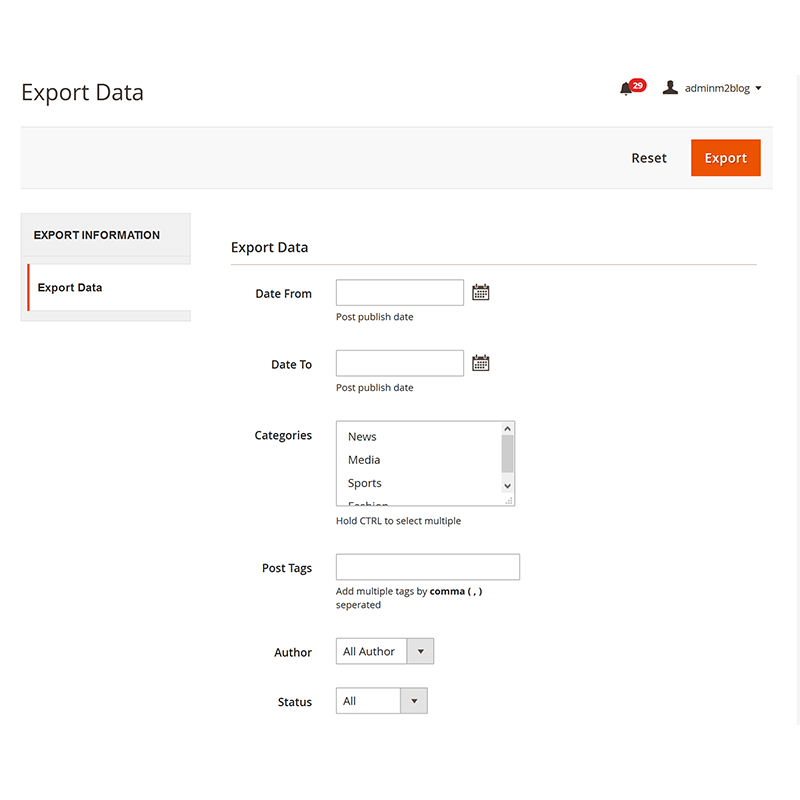
Import/Export posts with full data into admin.
Magento CAPTCHA for standard comment form.
Social share, author info, and comment on post detail page.
Blog URL - Admin can change blog URL dynamically from admin setting page.
Post title, date, author, image, description, categories and tags on post detail page.
Latest and featured blog - Display latest and featured posts on the homepage (admin can insert the widget on any page).
Post listing on a blog page.
Post listing on categories page.
Post listing on search result page.
Blog RSS Feed.
Blog XML Sitemap.
Post search sidebar widget with admin setting.
Month archives sidebar widget with admin setting.
Recent posts sidebar widget with admin setting.
Recent posts thumbnail on sidebar widget with admin setting.
Recent comments sidebar widget with admin setting.
Date Format option with admin setting.
Dynanic image resize options with admin setting.
Blog Page Layout options with admin setting.
Blog SEO- Metadata.
Disqus - Option to select default or Disqus comment from blog setting page.
Magento 2 Blog Module - Frontend
Blog post
The user can view and filter blog page, search result page, category archive page, month archive page, tag archive page, author archive page with pagination and comments count.
The user can view post(detail) page with title, date, author, image, post description, category, tag, social sharing, author info and comments listing with the comment form.
How to use sidebar block on magento 2 blog extension?
Sidebar
Admin can use search, recent categories, month archives, recent posts, recent comments and tag cloud block into left, right and both sidebar from blog setting page by enable or disable dropdown option. Also, admin can adjust a number of recent items from blog setting page.
SEO friendly - Blog Extension for Magento 2
Admin can easily set meta information for posts, categories, tags and authors. It will provide good search result on google.
Related Magento 2 Blog Extension Queries:
Magento 2 Blog Extension, Best Magento 2 blog Extension, Magento 2 Premium Blog Extension, Magento 2 Blog Module, Blog Extension for Magento 2, Magento 2 Premium Blog Extension, Better magento 2 Blog extension, Better Blog module for Magento 2
Reviews
5 Brilliant SEO Design
April 10, 2026
Everything from meta tags to XML sitemap support was well thought out.
- Sanjay Iyer
5 Easy to Manage Blogs
March 28, 2026
The dashboard gives full control over posts and categories. Very user-friendly.
- Chloe Davis
5 Smooth Integration
March 17, 2026
Integrates well with our Magento theme and didn’t require extra apps or tools.
- Arjun Reddy
5 Recommended for Stores
March 03, 2026
A must-have extension if you want to push content and improve organic traffic.
- Sophia Martinez
5 Great for SEO
February 19, 2026
SEO features helped rank our blog posts higher in search results with ease.
- Ishaan Kapoor
5 Increased Engagement
February 07, 2026
Comments and social share built right in made it easy for customers to interact with content.
- Emma Thompson
5 Loved the Customization
January 26, 2026
Tag clouds and sidebar widgets added a professional touch to our store blog pages.
- Aarav Deshmukh
5 Effective Blog Extension
January 14, 2026
Great for building a content marketing strategy right within Magento’s admin.
- Liam Wilson
5 Simple Yet Powerful
January 02, 2026
The admin panel is intuitive — even team members with limited experience can create posts easily.
- Meera Agarwal
5 Boosted Traffic Quickly
December 20, 2025
The archive widgets and dynamic URLs made our blog more organized and search-engine-friendly.
Every Pixlogix extension pack includes module files, an installation guide and a user guide depending on the extension you purchase, there also may be import files which can be used by you as examples.
Pixlogix extensions are easy to install. All you need is to have FTP/SSH access details, and follow below steps to complete.
Enable all cache from admin (System > Cache Management) before upload extension.
Extract extension zip package and copy all folders (app, lib, skin).
Upload all folders (app, lib, skin) to your site by FTP.
After uploading all files clear all cache from admin (System > Cache Management).
Logout to complete installation process and login again otherwise you will get 404 Error.
Check “Magento 1” Blog Extension tab available or not into admin navigation.
Is Magento Blog Module mobile responsive?
Yes Magento Blog Module is fully mobile responsive.
How can I get recent 3 posts on my home page?
Yes, you can use recent posts widget on CMS homepage editor.
Can I use grid or list view on frontend?
Yes, Blog extension have both options grid view and list view.
I have some other questions, how do I get support?
Feel free to contact us or please leave your feedback on live chat.
Can I get a refund if an extension doesn’t work?
We offer 25 days money back guarantee for all of our Magento products.
Release Notes
Release notes
Version 2.1.1 (Latest)
08 April 2026
Compatible with Magento Open Source: 2.2 2.3 2.4
Stability: Stable Build
New Features:
Added Hyva Theme compatibility for seamless integration with Hyva storefront.
Implemented support for all Google reCAPTCHA types:
reCAPTCHA v2 Checkbox
reCAPTCHA v2 Invisible
reCAPTCHA v3
Improvements:
Enhanced CAPTCHA configuration to align with Magento native reCAPTCHA settings.
Improved compatibility with the Hyva and latest Magento versions.
Fixes:
Minor code improvements and stability enhancements.
Version 2.0.8
13 January 2026
Compatible with Magento Open Source: 2.2 2.3 2.4
Stability: Stable Build
Description:
Tested with the following versions:
Magento 2.4.8
Magento 2.4.8-p3
Magento 2.4.9-alpha3
Version 2.0.7
20 March 2026
Compatible with Magento Open Source: 2.2 2.3 2.4
Stability: Stable Build
Description:
Tested with the latest version 2.4.7-p4
Version 2.0.6
18 April 2025
Compatible with Magento Open Source: 2.2 2.3 2.4
Stability: Stable Build
Description:
PHP compatibility testing with the most recent Magento versions 2.4.6-p3/p4
Version 2.0.5
14 June 2024
Compatible with Magento Open Source: 2.2 2.3 2.4
Stability: Stable Build
Description:
Tested with Magento 2.4.6 version
Version 2.0.4
14 April 2023
Compatible with Magento Open Source: 2.2 2.3 2.4
Stability: Stable Build
Description:
Related Posts grid on a post edit page.
Related Products grid on a post edit page.
Comments grid on a post edit page.
Added category column to the admin post grid.
Related Posts tab on frontend product detail page.
Related Posts section on frontend post detail page.
Related Products section on frontend post detail page.
Frontend short description character limit optimized on a listing page.
Frontend dynamic blog navigation and its categories navigation to the Magento 2 default navigation.
Show/Hide Grid Summary Section option from the settings page.
Replaced InstallSchema with db_schema.
Optimized code.
Version 2.0.3
14 October 2022
Compatible with Magento Open Source: 2.2 2.3 2.4
Stability: Stable Build
Description:
Testing and compatible with latest Magento 2.4.3 and 2.3.7-p1 version.
Flexibleblog extension provides blog creation feature with category, post, tag, author, comment, search, RSS Feed, Sitemap XML and Comment CAPTCHA.
Version 2.0.2
18 March 2022
Compatible with Magento Open Source: 2.2 2.3 2.4
Stability: Stable Build
Description:
Latest Magento release compatitibility
Version 2.0.1
16 April 2021
Compatible with Magento Open Source: 2.2 2.3
Stability: Stable Build
Description:
Magento 2 Blog extension has a blog category, post, tag, author, default comment with captcha, disqus comments, RSS feed, XML sitemap, SEO friendly and search post functionality.
$79.00
let's talk for your project
Get In Touch Now
Have a word with our expert consultants about your next project to get suggestive guidance & proposal.

 My Account
 Login
Login Checkout
 Cart
Cart