


Modern-day visitors make choices quickly. That’s why they expect confusion-free websites where they can find services and complete actions without unnecessary steps. When navigation feels stressful, they leave. Slow-loading pages drive them away even before exploring what the site actually offers. These issues can directly affect purchases.
Thinking–how to encourage them to explore the website further? The best way is to improve usability by addressing the issues that interrupt these journeys. Each change helps visitors browse with less effort.
Want to know the best way to increase interaction? In this blog, let’s look at the top 10 practical methods to improve website usability.
10 Practical Strategies to Enhance Usability and Customer Engagement
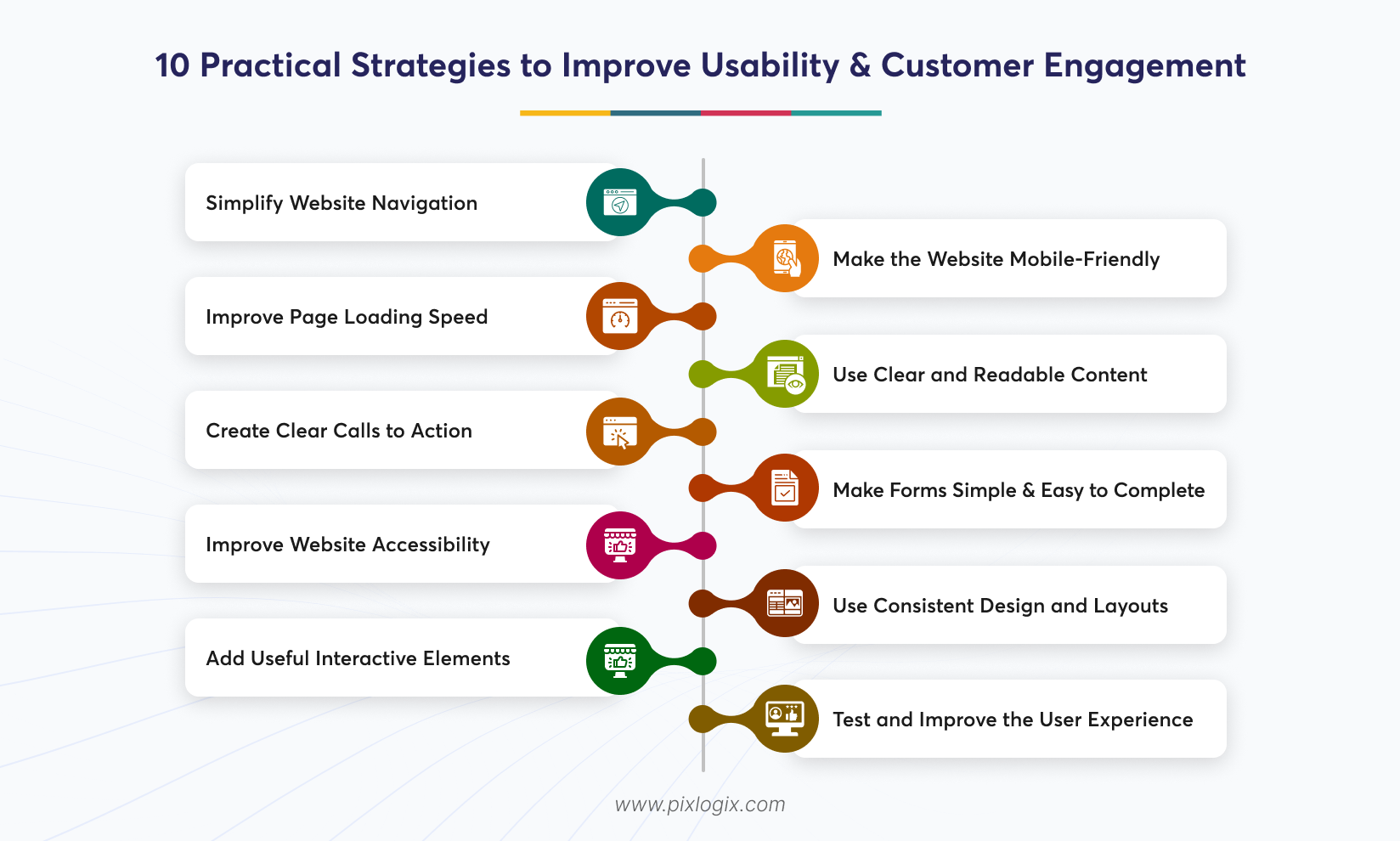
Several website elements shape the overall result. The following practices help businesses identify improvements that make everyday interactions more effective.
Simplify Website Navigation
Display information clearly. When visitors land on your site, they must find your key services easily. Don’t let them search every page. Instead, organize the navigation menu around important sections like services, pricing, or details. Use descriptive labels too. For larger websites, group related pages under logical categories.
Place internal links wisely. They should help visitors browse faster without creating chaos.
Make the Website Mobile-Friendly
Not all users have a laptop in hand. If they have a smartphone, then they’ll use it to access the site. So, pick responsive layouts. That will let your site work well on all types of screen sizes. Use touch-friendly buttons. And check that menus open correctly and forms remain usable on all screens.
Improve Page Loading Speed
Slow pages interrupt browsing. Loading speed also affects how quickly users can access important content and interact with website elements. Thus, check your site speed before launch. Compress images, reduce unnecessary scripts, and Reduce unnecessary scripts and avoid loading non-essential resources too early. Ensure efficient hosting too. Monitor real-user performance through Core Web Vitals, including LCP, INP, and CLS.
Use Clear and Readable Content
Your page’s purpose should serve one clear goal. This helps visitors understand your website easily. Don’t include dense paragraphs. It’s hard for users to find relevant information in them, which makes them leave. Also, write direct headings. Keep paragraphs focused and explain technical concepts in very simple language. You can also use bullet points. It highlights related information and uses descriptive subheadings to support scanning. Maintain color contrast too.
Create Clear Calls to Action
A CTA is the key checkpoint. Without clear direction, users get confused about proceeding further. Use specific labels. For example, “Request a Quote” or “Book a Consultation.” Make each CTA clear and actionable. Make sure each fits the page and appears where visitors need it, such as at checkout. A custom website design company can help you here. They can bring actionable CTAs that engage users better.
Make Forms Simple and Easy to Complete
Long forms look clumsy. So, ask only for details that are necessary to complete the intended task. Use clear field labels. Display validation messages near the relevant fields so users can correct them. Where appropriate, provide autofill support. A straightforward form reduces friction and makes checkout easier.
Improve Website Accessibility
A website must be easy to use. It should also work across different devices and support different ways of browsing. Now you might ask–how to improve accessibility? Add clear descriptions. Use color contrast to highlight and make text easy to read. Organize headings properly. Include clear form labels and internal links that explain their purpose. Users must know what happens when they click them. Read the WCAG. From there, you’ll get ideas about how to fix these issues.
Use Consistent Design and Layouts
Pick similar layouts for all pages. So that users can move around the site and understand the intent of each page well. Keep spacing consistent too. Reuse similar design elements where possible. A consistent design improves the website user experience. It helps visitors recognize familiar elements.
Add Useful Interactive Elements
Do include interactive features. This will support website visitor engagement by helping people find answers quickly. Searchable FAQs are the best example. Choose features that can solve real problems and make sure they show clear results. Avoid unwanted pop-ups. If you’re using autoplay videos, remove them as they might irritate users.
Test and Improve the User Experience
Planning to redefine your site? Then, do it after finding what visitors want and how they use your site. This is because what businesses expect may differ from what users actually do. Regular testing helps identify these gaps. Check different page layouts and CTA wording when enough visitors are available. Get help from a UI/UX design company in India. They can identify these usability problems and make changes that visitors need.
How Can You Measure Website Usability and Visitor Interaction?
Look at how visitors behave. Analytics can show where they face difficulties, and changes you make help them complete tasks.
Track these indicators:
- Engagement
Review engaged sessions and their relevant interactions. Also, understand how visitors use important pages.
- Navigation Paths
Examine where they visit. Check the routes they follow and where they abandon your site.
- Form Interactions
Monitor their actions from the very start. Analyze form errors and count how many visitors submit them successfully.
- Page Exits
Identify pages that make them leave. Then, investigate whether content gaps or technical issues contribute to the pattern.
- Conversion Actions
Measure completed purchases. Track enquiry submissions and registrations to see how many visitors sign up.
Use Google Analytics 4. Track meaningful interactions to understand website visitor engagement. Heatmaps can help too. It may reveal scrolling patterns, repeated clicks, or overlooked interface elements.
Analytics just boosts your examination. But they’ll never explain all the problems, so just ask your visitors. Get their feedback. Then, conduct usability tests to identify issues earlier.
What Common Website Usability Mistakes Should Businesses Avoid?
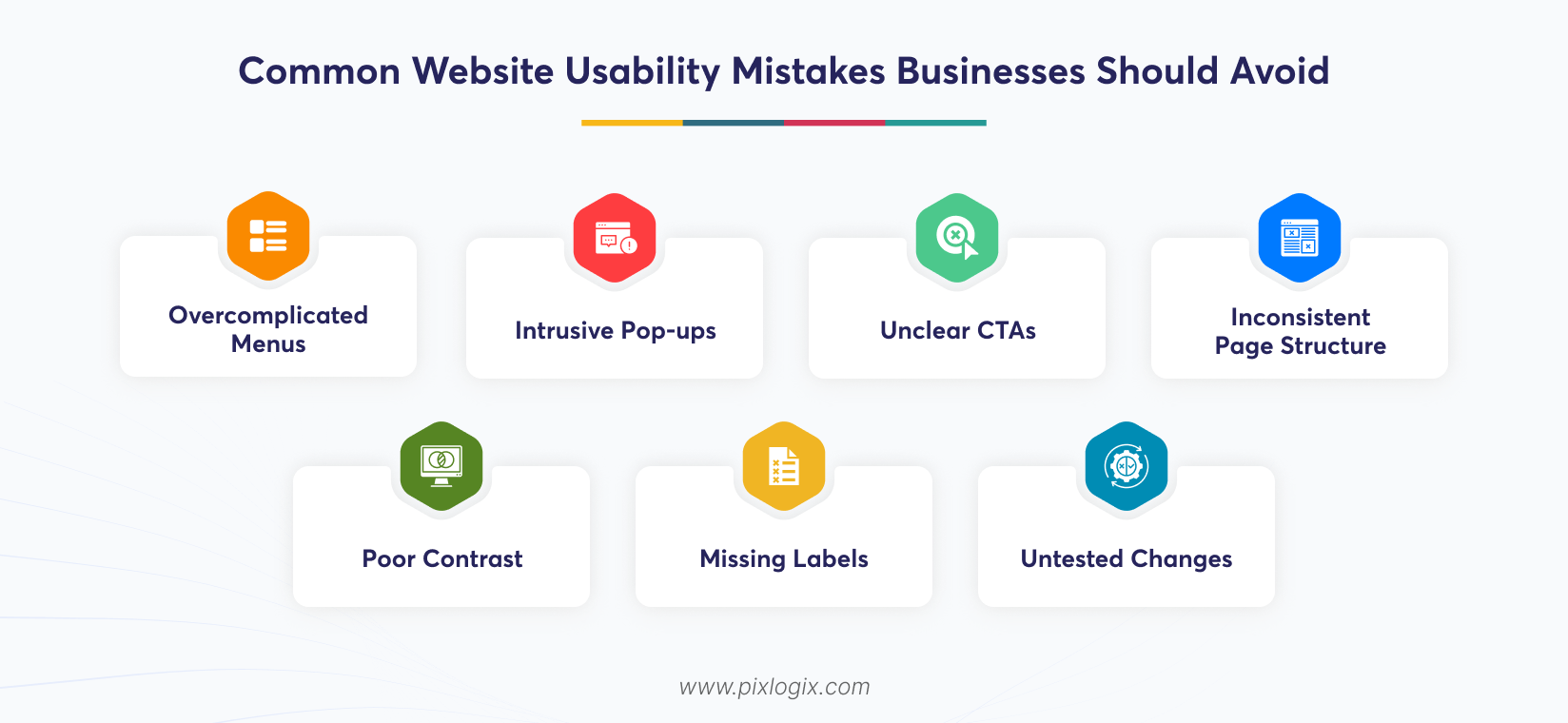
Website creation isn’t that simple. So, many mistakes can happen there, which affect the website user experience. Let’s look at the common ones:
- Overcomplicated menus that are hard to locate.
- Intrusive pop-ups.
- Unclear CTAs.
- Inconsistent page structures.
- Poor contrast or missing labels.
- Untested changes.
Address these issues earlier. Fix conversion barriers that prevent visitors completing important actions.
Conclusion
Visitors often like user-friendly sites. Clear navigation and quick-loading pages save their time. It can also help them find your services easily. Simple interactions matter too. Regular testing improves website usability by identifying browsing issues. Review your UX. Analyze it as visitors think and make changes accordingly.
Ready to build an engaging site? Then, partner with a custom website design company in India like Pixlogix. We make every interaction easier. Our team will help businesses improve website usability with intuitive layouts, accessible interfaces, and simple navigation. Contact us today! Let’s create a user-friendly website that helps visitors complete their intended actions.
Frequently Asked Questions
How can I tell if my website has usability problems?
First, watch them use it. Ask any of your customers to complete simple tasks like booking a call. Then, notice what makes them give up. High bounce rates and confused support emails also point to trouble.
What’s the difference between website usability and UX?
Usability helps visitors get things done. They should find pages, complete purchases, and navigate your site. User experience is bigger. It covers the entire visit, including design, speed, and content while browsing. Usability is one part of user experience.
How often should a business check its site’s usability?
Check twice a year. Find whether it shows any big change, like a new checkout flow or a major product launch. Note them closely. Whenever you notice drops in conversions, take action.
Will making my website easier to use bring in more sales?
Yes. Once visitors find what they need quickly, they’ll stay longer. Simpler forms build trust. Faster pages, clearer buttons, and smooth checkout will show that your site’s better than your competitors’ and make them comfortable. Fewer obstacles can help improve conversion rates.
What website usability improvements should a business prioritize first?
Fix what blocks people first. Ensure your pages load fast and your site works well on all devices seamlessly. Then simplify forms. Make checkout simple and find where visitors drop off most to fix them. When there are no major issues, there is no reason to leave.

Written by Samir Bhimbha Founder & CEO
Samir Bhimbha is the Founder & CEO of Pixlogix Infotech Pvt. Ltd. which offers web and app solutions to fulfill business's online needs and help to improve their online presence with many clients in the USA, Europe, Australia, and more. He is a skilled entrepreneur, web designer, developer, and team leader who can handle every situation. With 15+ years of experience in UX/UI design and web development, he is leading a team of IT professional talents.
Related Post

Why Businesses Need a Professional Web Development Company


Top 10 Signs Your Website Needs Better UI/UX

Get in Touch Now!
Have a word with our expert consultants about your next project to get suggestive guidance & proposal.
Sales Inquiry


HR Inquiry
 India’s First SOTD Winner on Awwwards.com – 2010